
Venue Zones
Assign zones such as courts, rooms, halls, fields, or sections to events within a single venue and automatically detect conflicts when events overlap in the same zone.
NOTE: Venue Zones requires The Events Calendar to apply zones to venues.
Built for venues with multiple sections and zones
Venue Zones is built for organizations that run events in complex venues with multiple sections or zones. Instead of splitting locations into separate venues, you can assign zones such as courts, rooms, halls, or fields directly to each event.
This approach improves organization, provides clearer scheduling within each venue, and automatically detects conflicts when events overlap in the same zone. The result is fewer mistakes, better space utilization, and a more predictable event management workflow.
Why Use Venue Zones?
Organize complex venues with clarity
Assign up to 50 zones such as courts, rooms, halls, fields, or sections directly to events within a single venue. This makes it immediately clear where an event is taking place without fragmenting locations into multiple venues.
This is especially useful for facilities that host simultaneous events across different spaces.

Keep venues clean and intentional
Venue Zones eliminates the need to create duplicate venues for every room or court. By keeping one venue as the source of truth and managing zones within it, your venue structure stays clean and easy to maintain.
This reduces admin clutter and keeps location management intuitive for staff.

Detect conflicts before they happen
Venue Zones automatically checks for overlapping events assigned to the same zone. If two events attempt to use the same space at the same time, conflicts are clearly identified.
This helps prevent double bookings and avoids last minute scheduling issues.
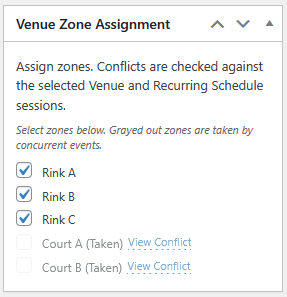
Assign zones directly from the event editor
Zones can be assigned to events directly from the event editor using a simple selector. There is no separate workflow, no syncing, and no additional setup required.
Once selected, the zone is immediately associated with the event for scheduling and conflict detection.
Improve scheduling across shared spaces
By assigning zones at the event level, Venue Zones provides better visibility into how spaces are being used throughout the day, week, or season.
This makes planning easier and helps maximize venue utilization.
Output ICS schedules and update external calendars
Venue Zones provides ICS calendar feeds at both the venue level and the individual zone level. These feeds can be used to export all events assigned to a venue or a specific zone into external calendar systems.
If LogicalWP Recurring Schedules is installed, recurring sessions are included automatically, ensuring both single events and multi-session programs appear correctly in the exported calendars.
These ICS links can be subscribed to in tools such as Google Calendar, allowing staff, coaches, or facility managers to stay up to date with scheduling changes outside of WordPress.
Built to work with The Events Calendar
Venue Zones integrates directly into The Events Calendar workflow, ensuring zone assignments and conflict detection work seamlessly alongside existing events, venues, and views.
No changes to how you create events. Just better organization underneath.
Who Venue Zones is built for
Venue Zones is designed for organizations that operate in venues with multiple sections or spaces rather than a single open area. It’s ideal for teams that need clear space assignment, reliable scheduling, and conflict prevention within shared locations.
This includes, but is not limited to, sports facilities, clubs, schools, academies, recreation centers, community halls, and any organization that runs simultaneous events across courts, rooms, fields, or other designated zones.